
Receipts are the gremlins of paperwork.
They show up in your purse, your car console, the bottom of a random bag, and somehow also in your email, your texts, and a screenshot you took at 11:47 p.m. when you were too tired to deal with it.
And the worst part is not even the volume.
It’s the uncertainty. The not knowing.
Because when you don’t know why you’re keeping a receipt, every receipt feels important. So you keep it “just in case,” toss it in a pile, and tell yourself you’ll sort it later.
Later becomes never. The pile gets thicker. You lose the one receipt you actually need. Then the day you do need proof, you end up digging through a wad of paper like you’re panning for gold in a river of regret.
This post is the simple fix.
We’re going to give receipts a job, give them one place to land, and define what “done” means so they can leave your house on purpose.
And if this kicks up bigger questions about what to keep forever, don’t worry. I covered that in my important documents organization post. Receipts are just one small part of the bigger paperwork picture.
How to Organize Paperwork and Receipts to Stop Piles (Quick Answer)
If you want paperwork organization that actually works for receipts, do this:
Pick one “receipt inbox,” drop every receipt into it, then process that pile by giving each receipt a job.
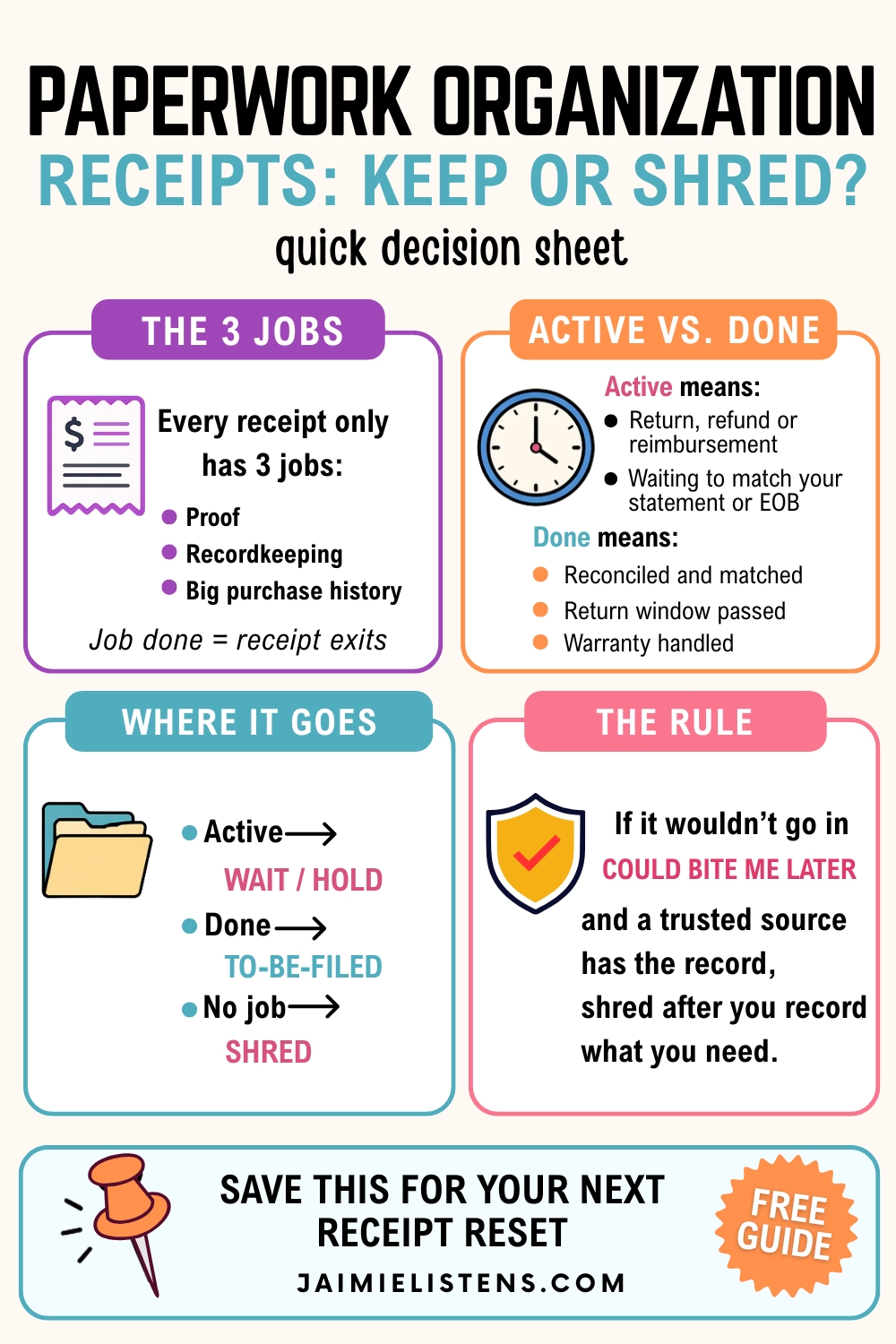
Most receipts only have three jobs: proof, recordkeeping, or big purchase history. Once the job is done, the receipt gets to exit instead of turning into permanent clutter.
This works best when you define what “done” means in your house, like reconciled, reimbursed, return window passed, or warranty handled. But the one change that makes the biggest difference is this: stop trying to file receipts perfectly and start finishing their job.
If you want the bigger picture version of this workflow, it’s part of my 4×4 System. Same logic, just applied to all your paperwork, not just receipts.
Now let’s walk through the three jobs receipts have, the fastest way to process them, and where they should live so you can find proof fast without keeping everything forever.
The 3 Jobs Receipts Have (So You Stop Treating Them All the Same)
Here’s the moment receipt piles start shrinking instead of multiplying:
You stop treating every receipt like it’s a legal document.
Receipts have jobs. Once you know the job, you know what to do with it. You also stop keeping random paper “just in case” because you finally have a reason.
1) Proof receipts
These are the receipts you keep because you might need to prove something.
Think:
- returns and exchanges
- warranties
- reimbursements
- disputes and “oopsie” charges
- medical bills and insurance messes
- anything tax-related you plan to claim
If someone can come back later and say, “We never got that,” or “You didn’t pay that,” a proof receipt gives you backup.
2) Recordkeeping receipts
These aren’t about defending yourself. They’re about tracking your life.
You keep these long enough to:
- enter them into your budget
- track spending patterns
- see what categories are creeping up
- stop wondering where your money went
Once you’ve captured the information you need, these don’t deserve a permanent home.
3) Big purchase history receipts
These are the receipts that belong with an item or a project.
Not in a yearly receipt stack. Not floating around in a “just in case” folder.
Think:
- appliances
- car repairs
- contractor work
- home improvement
- medical expenses you’re tracking
- business equipment
These receipts matter because they connect to something bigger. They help with warranty issues, insurance claims, resale value, and “when did we replace that thing?” questions.
The simple rule
If you feel stuck, ask this:
Is this receipt proof, recordkeeping, or big purchase history?
That one question turns a pile into a decision you can actually finish.
Next, I’ll show you a quick decision tree for what to do with each job, and how to set up one capture point so receipts stop spreading all over your life.
The Quick Decision Tree (Keep, Hold, File, Shred)
This is where receipts stop feeling like a moral obligation and start behaving like paperwork.
When a receipt lands in your receipt inbox, you only need to answer a few quick questions. No overthinking. No perfect filing.
Step 1: Is it still active?
Active means something is still in motion:
- you might return it
- you’re waiting for a refund
- you need it for reimbursement
- you’re waiting for the charge or credit to hit your statement
- you need to match it to an EOB or a corrected bill
If it’s active, put it in Wait/Hold.
Write a tiny note on it if needed: “waiting for refund” or “match to statement.”
Step 2: If it’s not active, does it have a long-term reason to exist?
Ask what job it has.
- Proof receipt: keep it until the risk passes
- Big purchase history: file it with the item or project
- Recordkeeping: keep it until you’ve captured the info you need
Step 3: Decide the ending
Here’s the simple landing path:
- KEEP (File it) if it’s proof or big purchase history
- HOLD if it’s still active
- SHRED if the job is finished and it doesn’t belong in your Could Bite Me Later home
If you wouldn’t file it in Could Bite Me Later, and you can pull the record from a trusted source later, shred it after you’ve recorded what you need.
The “done” triggers
A receipt earns its exit when:
- the return window passes
- the refund clears
- the reimbursement gets paid
- the warranty gets handled
- the statement matches
- the expense gets recorded
You don’t need to keep receipts forever. You just need to keep them long enough to finish their job.
Next, we’ll fix the part that actually makes this work in real life: one capture point, so receipts stop spawning in ten different places.
Set Up One Capture Point (So Receipts Stop Spreading)
Receipts don’t become a pile because you “don’t organize.”
They become a pile because they never had one obvious place to go in the first place.
So let’s fix that.
You need one receipt inbox
Not a perfect system. Not five “temporary spots.” One landing zone.
Pick something you can use without thinking:
- a folder
- an envelope
- a small tray
- a zip pouch
- a manila folder labeled RECEIPTS
Your goal is simple: every paper receipt goes there the minute it enters your house.
Match your capture point to real life
If your receipts land in the same places over and over, don’t fight it. Redirect it.
- Purse person? Put the folder where you drop your purse.
- Car console person? Keep an envelope in the glove box and empty it weekly.
- Counter person? Put the tray on the counter and make it official.
- “I have kids” person? Put it where you sort backpacks and mail.
The “right” spot is the spot you’ll actually use when you’re tired.
What about digital receipts?
Digital receipts still need one home too, or they turn into a second hydra.
Pick one simple rule:
- star the email and archive it
- screenshot and drop it into one album
- forward it to one email folder
- save it to one notes app folder
You don’t need a fancy app. You need a single place you can remember.
The weekly reset
Here’s the part that makes your capture point work:
Once a week, empty the receipt inbox.
Not perfectly. Just consistently.
Active receipts go to Wait/Hold.
Completed receipts go to To-Be-Filed.
Truly done receipts exit.
That’s it. One place to land, one day to process, and receipts stop spawning all over your life.
Active vs Done Receipts (The Step That Ends the Never-Ending Pile)
Most receipt systems fall apart for one reason:
They don’t separate receipts that are still “alive” from receipts that are finished.
So people either keep everything forever… or they shred something they end up needing.
Here’s the simple distinction that fixes that.
Active receipts
A receipt is active when something can still change.
You might:
- return the item
- get a refund
- submit it for reimbursement
- match it to a statement
- attach it to an insurance claim
- match it to an EOB or a corrected bill
Active receipts belong in Wait/Hold until reality matches the paper.
If you’re waiting on something specific, write it right on the receipt:
“Waiting for refund” or “Match to statement.”
Done receipts
A receipt is done when its job is complete.
That might mean:
- the return window passed
- the refund cleared
- the reimbursement paid out
- the charge matched your statement
- you recorded what you needed for your budget
- you filed it with the item or project it belongs to
Done receipts move to To-Be-Filed or they exit.
The close-the-loop habit
This is the whole secret:
Don’t save receipts “to organize later.”
Save them until they’re finished.
When you build that finish line into your system, the pile stops being a gremlin problem and starts being a short, manageable process.
Where Receipts Go After They’re Done (So You Can Find Proof Fast)
Once a receipt is finished, it shouldn’t float around your house like a loose sock.
It needs one of two outcomes:
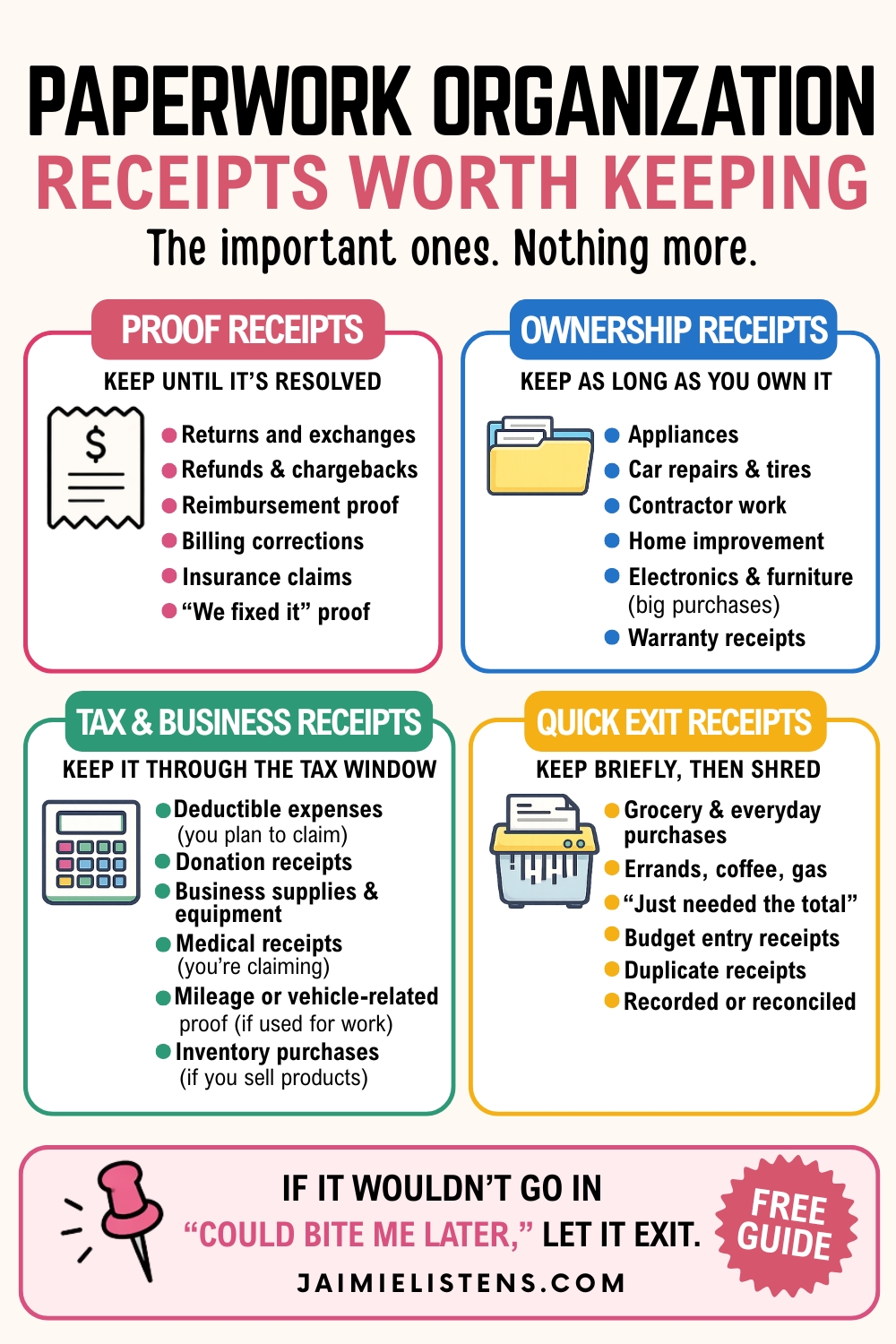
1) File it because it still has a job
This is where your 4×4 system makes receipts easy.
A done receipt usually goes into one of these homes:
- Ownership Records
Big purchases, warranties, appliances, car repairs, anything tied to an item you still own. - Could Bite Me Later
Disputes, corrections, reimbursements, insurance claim proof, anything you might need to defend later. - Need or Want (Default)
Receipts you keep for records or audits for a while, then shred at the appropriate time.
If you find yourself trying to decide whether something belongs in your “forever” category, that’s your cue to hop over to my important documents organization post. Receipts usually aren’t the forever papers. They’re the supporting actors.
2) Shred it because the job is finished
If you’ve already recorded what you needed and a trusted source can show the transaction later, don’t let paper hang around out of anxiety.
Let it exit.
That’s the difference between a receipt system and a national hall of records.
Big Receipts Need Their Own Home (Not “Receipts 2026”)
This is where a lot of receipt systems quietly fail.
People do all the right things, then they take a big receipt and shove it into a yearly pile like:
“Receipts 2026.”
That sounds organized. It also guarantees you’ll never find it when you need it.
Big receipts don’t belong with other receipts. They belong with the thing.
What counts as a “big receipt”?
Anything tied to an item, a project, or an expensive problem, like:
- appliances
- car repairs and tires
- contractor work
- home improvement
- medical expenses you’re tracking
- business equipment
- furniture or electronics you’d actually cry over replacing
Where to file them instead
File big receipts in Ownership Records while you still own the item.
If you might need proof later because of a warranty, an insurance claim, a dispute, or a billing correction, file it in Could Bite Me Later.
That’s it. You’re not building a complicated system. You’re just putting the receipt where your brain will look first when something goes sideways.
Quick business note: Most receipts follow a simple timeline. Inventory doesn’t. If you still use the supplies or you still sell products made from them, those purchase records still matter, no matter how old they are.
If you sell products, keep inventory purchase receipts longer. My rule is 3-7 years after the sale or use of the item, not from the date the inventory was purchased.
Quick habit that makes this painless
When you buy a big item, do one small thing before you toss the bag:
Write what the receipt is for right on it.
“Dishwasher” or “Tires” or “New glasses.”
Your future self will love you for that.
Next, we’ll talk about the weird little receipt problem nobody warns you about: magic disappearing ink.
Protect Yourself From Fading Receipts
Nobody tells you this when they say, “Just keep the receipt.”
A lot of receipts are printed on thermal paper. That means the ink fades. Heat, light, time, and being crumpled in a purse like a tiny hostage situation can turn your “proof” into a blank strip of sadness.
So if you’re keeping a receipt because it matters, make sure it stays readable.
Use the “worth keeping” rule
If you would file it in Could Bite Me Later or Ownership Records, don’t trust thermal paper alone.
Do one quick backup step.
Fast options that don’t turn into a whole project
- Take a clear photo and save it in one place
- Scan it during your weekly reset
- Make a quick copy and staple it to the warranty paperwork or user manual
- Write the date and amount on it before it fades
You don’t need to digitize your entire life. You just need to protect the receipts that actually protect you.
Next, I’ll summarize your how your new receipt system might look like so your pile finally stops reproducing like rabbits.
15 Ways to Flatten the Curve and Stop Receipt Creep
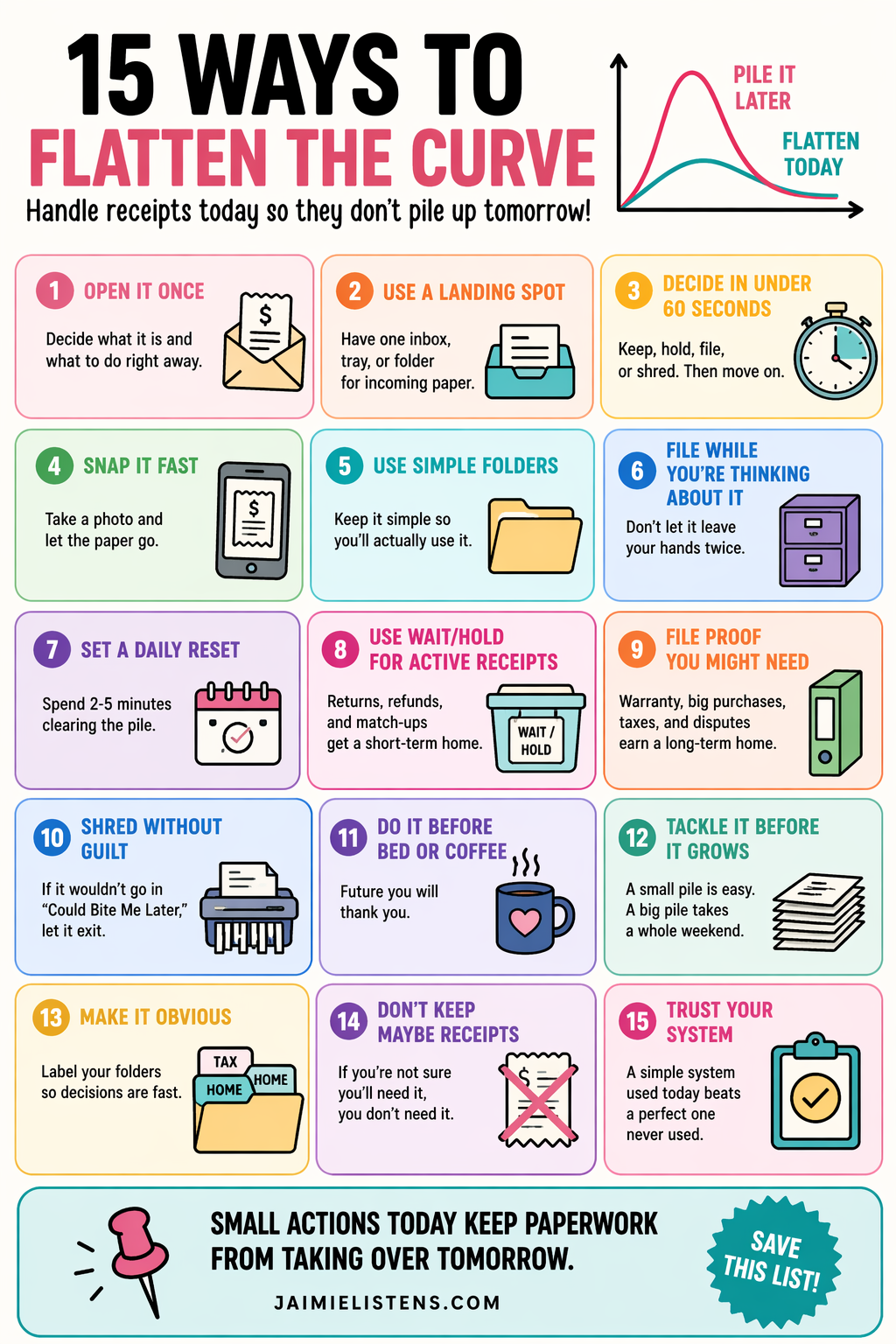
Because this happens to everyone, but some people implement the little tricks and habits that keep paperwork from becoming a mountain of doom.
- Pick one receipt inbox.
One spot. Every time. No exceptions. - Empty pockets and bags into the inbox.
Purse, car console, wallet, random tote. Feed the inbox, not the chaos. - Sort receipts by “active vs done” first.
Stop trying to file. Just separate what’s still in motion from what’s finished. - Write a note on active receipts.
“Waiting for refund.” “Match to statement.” Future You will thank you. - Give every receipt one job.
Proof, recordkeeping, or big purchase history. That’s it. - Treat proof receipts like protection, not clutter.
Keep them until the risk passes. Then let them go. - Don’t mix proof receipts with recordkeeping receipts.
That’s how you end up with a fat folder and still can’t find the one you need. - Define “done” in your house.
Reconciled, reimbursed, return window passed, warranty handled, statement matches. - Shred anything that doesn’t belong in “Could Bite Me Later.”
If it wouldn’t go in that home, don’t keep it out of anxiety. - Use the “trusted source” rule.
If a trusted source can show the record later and you don’t need the paper as proof, let it exit. - Create one home for digital receipts.
One album, one email folder, one notes folder. Don’t build a second hydra. - Do a weekly receipt reset.
Once a week, process the inbox. Not perfectly. Just consistently. - File big receipts with the item, not the year.
Stop dumping warranties and appliance receipts into “Receipts 2026.” - Label big receipts in Sharpie.
“Dishwasher.” “Tires.” “Contractor.” Make retrieval friction-free. - Protect receipts that fade.
Photo, scan, or copy-and-staple to the manual/warranty. Don’t save a ghost.
Picture This: Receipts Contained and Easily Accessible
You walk in the door and drop receipts into one spot. Not three. Not “wherever my hands were.” One receipt inbox.
Once a week, you process that pile fast.
Active receipts go into Wait/Hold with a quick note if you’re waiting on something. Done receipts move to To-Be-Filed. The ones with a real job get a home. The ones that don’t get shredded without guilt.
When a refund goes through or a charge finally posts, you don’t have to dig. You already know where the proof lives. And when you buy something expensive, you don’t toss the receipt into “Receipts 2026” and pray. You file it where your brain will look first.
So receipts stop feeling like a never-ending gremlin problem.
They become a short, boring routine.
Which is exactly what paperwork should be.

AI Disclosure: This post was created with the assistance of AI tools for brainstorming, editing, and organization, which helps me manage chronic pain and physical limitations during long writing sessions. All content is based on my real-life experience and is reviewed and edited by me. Some or all images in this post may be AI-generated for illustration and inspiration. Learn more about how I use AI here.
Disclaimer: Jaimie is not the great and powerful Wizard of Oz, a lawyer, a doctor, a veterinarian, or a CPA. Nothing you read in my blog is a substitute for professional advice and doing your own good research. Remember that just because someone has credentials doesn’t guarantee their advice is golden or perfect. Put your smart hat on and do your due diligence. Good luck!

Leave a Reply